
IPTV Smarters Lite: Switch Players or Choose a New Plan
Looking for IPTV Smarters Lite because you want a different player or need to set up a new device? Before buying anything, check whether you already have a service account you can use. Changing the application does not automatically mean you need another subscription.
This guide helps you separate a player change from a new service purchase. If you do need access, our plans start at EUR 19.99 for three months, with one-year options for one or two screens.
Compare our plans and confirm the right access for your device before ordering.
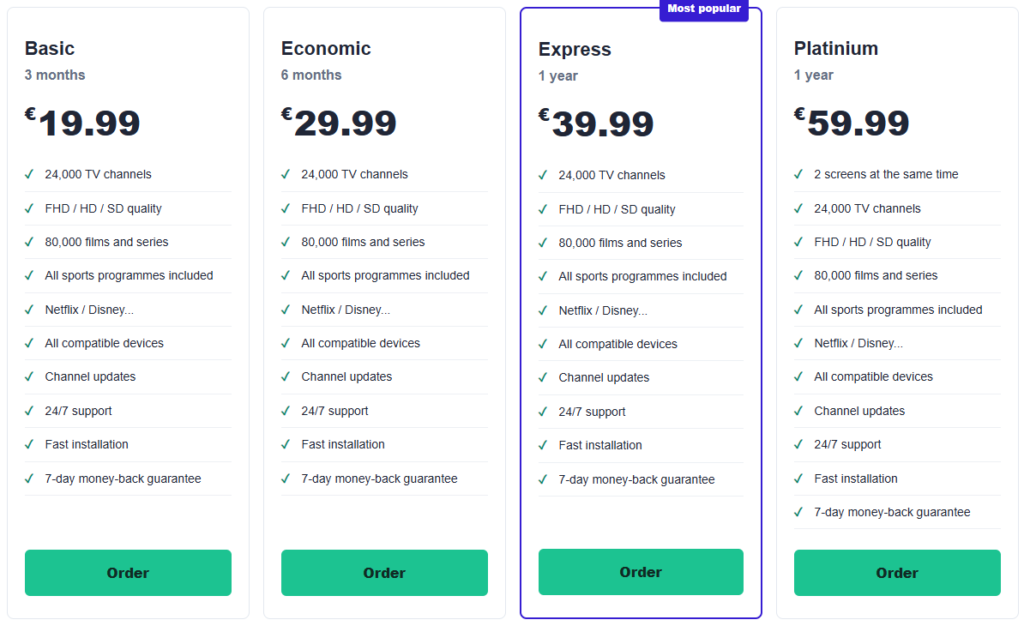
Table of Contents
IPTV Smarters Lite: identify the app before choosing a plan
The application discussed here is listed as Smarters Player Lite by WHMCS SMARTERS. The Smarters Player Lite App Store listing describes a standalone media player supporting formats including M3U and JSON playlists. It does not supply its own channels or streaming subscriptions; you provide legally obtained media.
That distinction matters when a search returns several similarly named products. Check the full application name and developer on your device. A familiar icon or the word “Smarters” alone does not establish that you are installing the same product.
For IPTV Smarters Lite, keep three things separate: the player, any optional purchases inside it, and your service account. Paying for one does not automatically activate the others. Read the description of each purchase rather than treating every payment as a subscription renewal.
Keep your current access or start with a new plan?
You already have a working subscription
Ask your existing provider whether its access works with the specific player and device you want to use. Confirm the supported connection method and any restrictions on switching devices. A working account in another application is useful information, but not proof of compatibility with every player.
Do this before placing another order. If your current service supports the new setup, a player change may be all you need. Also confirm the account’s expiry date: moving to another application does not, by itself, extend the paid period.
You are starting without a service account
Installing IPTV Smarters Lite prepares the player, not the content source. Before buying access, identify your device, the required connection format and the number of simultaneous streams you need. Then compare plans that meet those requirements.
Ask what the service includes and whether the content is authorised for your use. Do not infer a particular channel catalogue from the application name. A player can display different sources, so its branding does not describe what a separate provider supplies.
Our plans for your new setup
Once compatibility is confirmed, choose a subscription length that matches your needs. The prices below are for the complete stated period. They are service-plan prices, not the price of downloading the player or unlocking an optional app feature.
| Plan | Duration | Price per period | Screens |
|---|---|---|---|
| Basic | 3 months | EUR 19.99 | 1 screen |
| Economique | 6 months | EUR 29.99 | 1 screen |
| Express | 12 months | EUR 39.99 | 1 screen |
| Platinium | 12 months | EUR 59.99 | 2 screens |
Review the plan conditions and choose Basic, Economique, Express or Platinium.
For a new IPTV Smarters Lite setup, Basic offers a three-month period, while Economique covers six months. Express provides twelve months with one screen. Platinium is the twelve-month option with two screens; confirm how those connections are configured before ordering.
Choose the shorter period if that is all you expect to need. An annual plan can suit regular use, but its lower monthly equivalent is not a monthly billing offer. Express costs EUR 39.99 for the full twelve-month period, not EUR 3.33 payable month by month.
4 checks before switching to IPTV Smarters Lite
1. Keep the information needed to restore your old setup
Before removing a working player, make sure you can retrieve your account details and identify your provider. Keep the original delivery message and order reference somewhere private. Do not assume another application will automatically discover or import the existing account.
If you save screenshots for your own reference, protect them like other account information. Hide credentials before sharing an image with support. A playlist address can contain access information even when it does not look like a conventional password.
2. Confirm what can move between applications
Your service account and your player preferences are different things. Ask whether the same access can be used in the new application. Separately, check whether there is a supported way to transfer favourites or other preferences; do not assume they follow the account.
Make a short note of anything you would want to recreate manually. This can be more useful than discovering after deletion that a personalised list existed only in the previous player.
3. Check the new device, not just the application name
The Apple listing identifies iPhone, iPad and Apple TV. That does not establish availability on every smart television or other device. Check the store and current system requirements for the exact equipment you intend to use.
Our application information page provides a starting point. Match that information to your installed version before proceeding. Avoid treating instructions for another Smarters product as an exact description of your screen.
4. Avoid testing two streams against a one-screen allowance
When comparing players, stop playback in the old application before starting the new one if your account permits only one stream. Otherwise, you may introduce a connection-limit issue into a test intended to assess the new player.
This is a precaution, not a diagnosis of every playback problem. Ask your provider how it counts active connections and whether a device switch requires any additional action. Do not buy a second plan merely because an unexplained error appears.
Use the 24-hour trial to check the setup you will actually keep
Our trial lasts 24 hours. Ask about its availability, activation time and connection allowance before requesting access. If you are considering a new IPTV Smarters Lite subscription setup, prepare the intended device first so you can make practical use of the trial period.
Try the controls you will use daily: opening your source, selecting authorised content, adjusting playback and returning to the library. Check on the screen and network you expect to keep using. A quick test on your phone does not confirm the experience on a different television.
Write down any issue with its time, device and exact message. A successful trial is an observation of those conditions, not a guarantee of identical performance throughout a future subscription. Confirm that the paid package covers the use you have evaluated.
When the new player behaves differently
If IPTV Smarters Lite accepts your source but the layout differs, distinguish presentation from access. The order of categories or location of controls may differ between applications. Start by checking the relevant menu rather than assuming the subscription has changed.
If sign-in fails, review the supplied details and required connection method. If only one item will not play, report that distinction. Keep the previous configuration available until you understand the problem, without running more simultaneous streams than your plan allows.
Our English-language setup guides can help you find relevant explanations. For account activation, expiry or connection permissions, ask the service provider using your order reference. An application setting cannot extend an expired subscription.
Why consider our service for your new setup?
Our four plans let you compare the commitment in practical terms: three, six or twelve months, with a separate two-screen annual option. You can select the period you need after checking the device and access method, rather than choosing a longer term before knowing whether the setup suits you.
Visit our English homepage for an introduction to the service, then review the conditions of the specific package. Confirm delivery, activation and screen use before paying. The plan should match your requirements, not create another unused account.
IPTV Smarters Lite questions before you switch
Do I need to buy another subscription to change players?
Not necessarily. Ask your current provider whether your existing account supports the new application and device. Buy new access only after establishing what your current service does or does not cover.
Will my favourites appear automatically in the new app?
Do not assume so. Check whether the applications offer a supported transfer method. Keep a private note of important preferences before deleting the previous setup.
Does paying for an app feature extend my service account?
Not automatically. An in-app purchase and a separately supplied subscription are different transactions. Check what the payment covers and which company handles that purchase.
Can I compare both players while they are streaming?
Only if your service permits those simultaneous connections. With a one-screen allowance, stop one stream before testing the other and confirm any device-switching rules with your provider.
Which plan provides twelve months with two screens?
Platinium provides twelve months with two screens for EUR 59.99. Confirm how the screens are activated and any network restrictions before choosing it.
Choose your IPTV Smarters Lite setup without paying twice
First identify the correct application, then establish whether your existing access can move with you. If you need a new service, check compatibility and trial conditions before selecting the duration and screens you require.
Explore plans from EUR 19.99, including Express at EUR 39.99 for one year with one screen.
Ready to choose your subscription?
Compare Standard and VIP plans to find the right duration and options for your devices.